
How Can You Trigger Google’s AI Overview to Appear in Your Search Results?
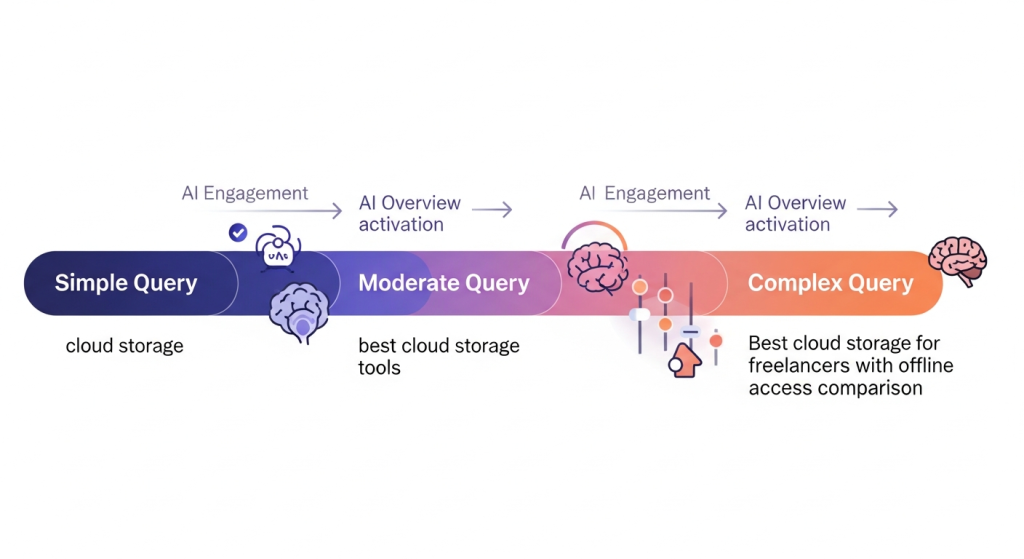
To trigger Google’s AI Overview in your search results, start by using conversational, question-based queries that prompt Google’s algorithm to display a summarized answer. Phrase your search in a natural way as if you were asking another person, and focus on complex or multi-part questions that require synthesis or explanation. For instance, rather than searching “cloud storage options,” try asking, “What are the best cloud storage services for small businesses and how do they compare?” This approach makes it more likely for Google’s AI Overview feature to activate, especially for queries that benefit from a concise summary across multiple sources1.
Strategies to Trigger AI Overviews
You might be wondering: Are there practical steps you can take to see the AI Overview more consistently? Here’s what works for most users:
- Ask How-To or Explanatory Questions: Queries like “How do I bake gluten-free bread step by step?” or “Explain zero trust cyber security” work well.
- Include Contextual Keywords: Using terms such as “overview,” “summary,” or “guide” increases your chances. For example: “Project management tools overview” or “Beginner’s guide to ETFs.”
- Experiment with Specificity: Make your question unique or add location/context, like “Best family-friendly museums near Central Park with reviews.”
- Enable Search Generative Experience (SGE) in Labs: If you’re in the United States, access Search Labs via labs.google.com/search, log in with your personal Google account (not a business or incognito session) and turn on AI Overviews. This feature is rolling out beyond the US as well, but currently works best for English queries in select regions.
Common Scenarios & Troubleshooting
You might also wonder: What if you’re not seeing AI Overviews even after crafting the perfect question?
- Check your Search Labs settings: Make sure SGE/AI Overviews are enabled
- Use a supported account: Business or incognito accounts likely won’t display the feature
- Try mobile or desktop: Rollouts sometimes appear on mobile before desktop
- Make your question more complex: If your query is too simple, AI Overview may not trigger
| Standard Query | AI Overview-Friendly Query | Why it Works |
|---|---|---|
| Toronto weather | Best time to visit Toronto for weather and festivals | Multi-part, requires synthesis |
| Online degree | Comparison of top online business degrees in Canada | Specific, asks for comparison/overview |
What to Remember & Next Steps
- Phrase questions naturally and include keywords like “overview,” “summary,” or “guide” for best results
- Enable Search Labs’ SGE feature if available in your region
- Experiment and rephrase if you don’t see the overview immediately
- Trust, but verify: Use the AI Overview for quick insights, but consult linked sources for important decisions
Want to stay ahead as search evolves? Keep up with Google’s ongoing updates and try new phrasing regularly, especially as AI Overviews expand internationally and into new languages. Contact Magno iQ for the best in done for you service.